Resolving CORS Issues in Ionic-Odoo Integration
Learn how to resolve CORS issues when integrating Ionic applications with Odoo SaaS. Explore server-side options, client-side solutions, and proxy approaches for seamless API communication.
What are the best approaches to resolve CORS issues when developing an Ionic application that interacts with Odoo SaaS? Are there configuration options in Odoo that can allow cross-origin requests without requiring a middleman service?
Resolving CORS issues in Ionic-Odoo integration requires understanding both client-side and server-side constraints. While Odoo SaaS doesn’t provide built-in CORS configuration options, developers can implement several approaches to enable cross-origin requests between mobile applications and the Odoo API without relying on middleman services.

Contents
- Understanding CORS Issues in Ionic-Odoo Integration
- Odoo SaaS CORS Limitations and Constraints
- Server-Side CORS Configuration Options
- Client-Side Solutions for Ionic Applications
- Proxy and Middleman Services as CORS Workarounds
- Sources
- Conclusion
Understanding CORS Issues in Ionic-Odoo Integration
CORS (Cross-Origin Resource Sharing) creates significant challenges when building Ionic applications that need to communicate with Odoo SaaS. What exactly happens when your Ionic app tries to make API calls to Odoo? The browser blocks the request because it comes from a different origin—your mobile app domain versus the Odoo server domain. This security mechanism prevents potential cross-site scripting attacks but also complicates legitimate integrations between your Ionic framework application and Odoo’s API endpoints.
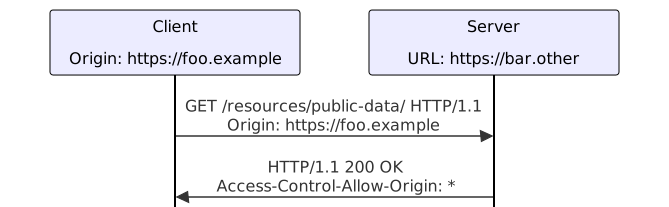
When your Ionic application fetches data from Odoo, the browser first sends a preflight request using the OPTIONS method to check if the server allows cross-origin requests. If Odoo doesn’t respond with the proper Access-Control-Allow-Origin headers, the browser blocks the actual request. The MDN Web Docs explains that this mechanism is fundamentally designed to protect users, but it can be frustrating when you’re trying to build legitimate integrations between your mobile app and Odoo’s services.
The core issue lies in the fact that Ionic applications typically run in a web view or browser environment, while Odoo SaaS operates under strict security policies that don’t allow cross-origin requests by default. You might be wondering—why can’t Odoo just allow all origins? Well, that would create security vulnerabilities, so the platform maintains its default stance of restricting cross-origin access.
Odoo SaaS CORS Limitations and Constraints
Odoo SaaS presents specific limitations when it comes to CORS configuration options. According to the Odoo documentation, there are no built-in CORS configuration options available for SaaS instances. This means you can’t simply toggle a setting in the Odoo admin interface to allow cross-origin requests from your Ionic application. The documentation focuses on the JSON-2 API, authentication via bearer tokens, and how to call endpoints, but completely omits any mention of CORS settings or cross-origin options.
Why is this the case? Odoo SaaS is designed as a multi-tenant platform where each instance serves multiple customers. Allowing arbitrary CORS headers could create security risks, as it would potentially expose one customer’s data to requests from other origins. The platform prioritizes security over convenience, which means you’ll need to find alternative approaches to enable your Ionic-Odoo integration.
You might be thinking about self-hosted Odoo instances versus SaaS. With self-hosted Odoo, you have more flexibility to modify server configurations and add CORS headers directly. However, with Odoo SaaS, you’re working within a controlled environment where the service provider manages all server settings. This constraint significantly limits your options for resolving CORS issues through server-side modifications alone.
The lack of built-in CORS support in Odoo SaaS forces developers to explore alternative strategies. Some have tried contacting Odoo support for custom configurations, but this approach often yields limited results. The platform’s architecture prioritizes security and isolation, making CORS configuration a low priority feature for their SaaS offering.
Server-Side CORS Configuration Options
While Odoo SaaS doesn’t provide direct CORS configuration, understanding how CORS works server-side can help you explore potential solutions. The MDN Web Docs explain that CORS is fundamentally an HTTP-header based mechanism where the server must respond with specific headers to indicate which origins are permitted to access resources. For credentialed requests, the server must include Access-Control-Allow-Credentials and specify the exact origin instead of using wildcard values.
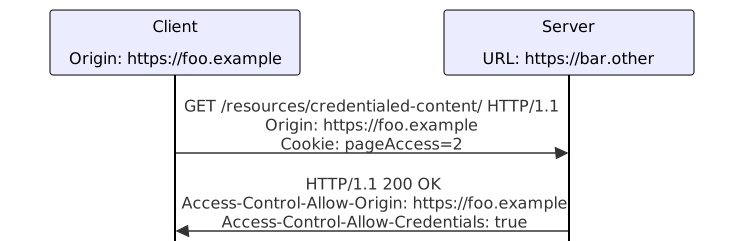
In an ideal scenario, Odoo would respond with headers like:
Access-Control-Allow-Origin: https://your-ionic-app-domain.comAccess-Control-Allow-Methods: GET, POST, PUT, DELETE, OPTIONSAccess-Control-Allow-Headers: Content-Type, AuthorizationAccess-Control-Allow-Credentials: true
However, with Odoo SaaS, you can’t modify these server responses directly. The platform handles all server-side configurations, and their default stance is to not include CORS headers in responses. This creates a fundamental limitation for Ionic applications trying to communicate directly with Odoo APIs.
For self-hosted Odoo instances, you could potentially modify the web controllers to add CORS headers, but this would require custom development and server access. You’d need to identify the specific controllers handling API requests and modify them to include the appropriate CORS headers. This approach isn’t feasible with Odoo SaaS, where you don’t have direct server access or the ability to modify the underlying codebase.
The server-side CORS configuration options remain limited for Odoo SaaS users. You’re essentially constrained by the platform’s security policies and cannot implement the standard CORS headers that would normally resolve cross-origin issues in web applications.
Client-Side Solutions for Ionic Applications
Since server-side CORS options are limited with Odoo SaaS, let’s explore client-side solutions for your Ionic application. The most straightforward approach is to implement a proxy solution within your Ionic app itself. This doesn’t require modifying Odoo’s configuration but instead works by routing your requests through a server component you control.
Ionic applications can use Capacitor’s HTTP plugin or the browser’s fetch API with specific configurations. However, these approaches still face CORS restrictions when trying to communicate directly with Odoo. You might be wondering—what if we modify the request headers or use different HTTP methods? Unfortunately, browser security policies are strict about cross-origin requests, and these modifications alone won’t bypass the fundamental CORS restrictions.
Another client-side approach involves using Ionic’s native plugins like the HTTP plugin, which might bypass some CORS restrictions by handling requests at a lower level. However, this approach has limitations and may not work consistently across all platforms. Plus, it doesn’t address the core security concerns that CORS is designed to prevent.
For Ionic applications, the most reliable client-side solution involves implementing a proxy within your app that forwards requests to Odoo. This could be a simple Node.js service running alongside your Ionic development server, or it could be integrated into your existing backend infrastructure. The proxy would handle the cross-origin communication on behalf of your Ionic app, effectively masking the origin of the requests.
You might also consider using Ionic’s Capacitor plugins that provide native networking capabilities. These plugins can sometimes bypass browser-level CORS restrictions by handling requests at the native level rather than through the web view. However, this approach requires careful testing and may introduce platform-specific complexities.
Proxy and Middleman Services as CORS Workarounds
Proxy services represent the most practical solution for resolving CORS issues in Ionic-Odoo integrations, especially when working with Odoo SaaS. A proxy service sits between your Ionic application and Odoo, effectively masking the cross-origin nature of your requests. When your Ionic app makes a request to Odoo, it actually sends the request to your proxy, which then forwards it to Odoo and returns the response back to your app.
The beauty of this approach is that it completely bypasses CORS restrictions because the communication happens between servers rather than between a client browser and a server. Your Ionic app communicates with your proxy (same origin), and your proxy communicates with Odoo (server-to-server). This two-step process eliminates the cross-origin issues you’d encounter with direct API calls.
There are several ways to implement proxy solutions:
- Cloud-based proxy services like CORS Anywhere, Heroku proxy, or custom AWS Lambda functions
- Self-hosted proxy solutions using Node.js, Express.js, or similar technologies
- Backend-as-a-Service platforms like Firebase, Supabase, or custom API gateways
For Ionic applications, you might implement a simple Node.js proxy that handles the Odoo API calls. The proxy would receive requests from your Ionic app, add the necessary authentication headers, forward the requests to Odoo, and then return the responses. This approach gives you full control over the communication flow while maintaining security.
You might be thinking—doesn’t this add complexity to my application? While it does introduce an additional component, the benefits often outweigh the costs. The proxy solution provides a clean separation of concerns, better error handling, and the ability to implement additional features like request caching, rate limiting, or data transformation.
Another advantage of proxy solutions is that they work consistently across different platforms and browsers. Since the proxy handles the cross-origin communication at the server level, your Ionic application doesn’t need to worry about browser-specific CORS implementations or restrictions.
Sources
- Odoo External API Documentation — JSON-2 API and external integration guide without CORS options: https://www.odoo.com/documentation/19.0/developer/reference/external_api.html
- MDN Web Docs CORS Guide — Comprehensive explanation of Cross-Origin Resource Sharing mechanisms and requirements: https://developer.mozilla.org/en-US/docs/Web/HTTP/CORS
- MDN CORS Credentials Support — Detailed information about Access-Control-Allow-Credentials header usage: https://developer.mozilla.org/en-US/docs/Web/HTTP/CORS#requests_with_credentials
Conclusion
Resolving CORS issues in Ionic-Odoo integration requires a multi-faceted approach since Odoo SaaS doesn’t provide built-in CORS configuration options. While the ideal solution would involve server-side CORS headers that Odoo doesn’t currently offer, developers can effectively work around these limitations through proxy and middleman services. The proxy approach remains the most reliable method, allowing your Ionic application to communicate with Odoo without cross-origin restrictions by routing requests through a server component you control. For self-hosted Odoo instances, custom server modifications might be possible, but for SaaS users, proxy solutions provide the most practical path forward in enabling seamless integration between mobile applications and Odoo’s powerful API capabilities.
The Odoo documentation does not mention any CORS configuration or cross-origin options for the SaaS instance. It only describes the JSON-2 API, authentication via bearer token, and how to call the endpoints. Therefore, the page does not provide a direct solution to CORS problems. Developers normally need to use a proxy or middle-man service to avoid cross-origin restrictions. The documentation does show how to create an API key in the preferences UI, which is required for any external calls.

CORS is an HTTP-header based mechanism that allows a server to indicate which origins are permitted to load resources. The server must respond with an Access-Control-Allow-Origin header, and for credentialed requests it must also include Access-Control-Allow-Credentials and an explicit origin instead of the wildcard. If the server does not support CORS, a common workaround is to use a proxy or modify the server configuration to add the required headers. The MDN guide does not mention any specific configuration options for Odoo SaaS, so you would need to consult Odoo’s own documentation or contact their support for CORS settings.
