JavaScript Object Destructuring: Syntax and Purpose
Learn how JavaScript object destructuring works with examples like `const { x } = y` and `const { index, axis, value } = event.detail`. Discover syntax, purpose, and advanced techniques.
How does JavaScript object destructuring work in the examples const { x } = y and const { index, axis, value } = event.detail? What is the syntax and purpose of this feature?
JavaScript object destructuring is a powerful feature that allows you to extract properties from objects into distinct variables in a single statement, dramatically reducing boilerplate code and making your JavaScript cleaner and more readable. In const { x } = y, the variable x is created and assigned the value of the x property from object y, while const { index, axis, value } = event.detail extracts multiple properties from the event.detail object into separate variables.
Contents
- Understanding JavaScript Object Destructuring Syntax
- How Object Destructuring Works: Basic Examples
- Advanced Object Destructuring Techniques
- Common Issues: Cannot Destructure Property
- Practical Applications of Object Destructuring
- Sources
- Conclusion
Understanding JavaScript Object Destructuring Syntax
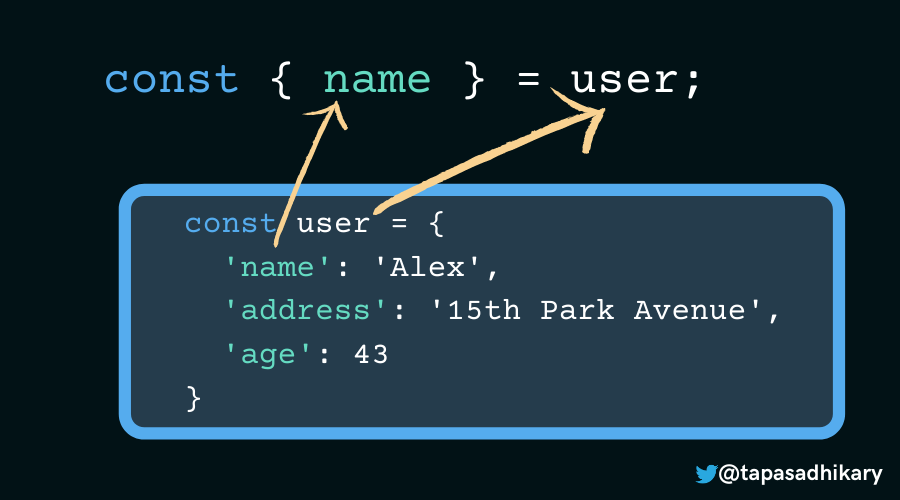
Object destructuring in JavaScript is an expression syntax that allows you to unpack properties from objects into distinct variables. This feature was introduced in ES6 (ECMAScript 2015) and has since become a fundamental part of modern JavaScript development. The syntax uses curly braces {} on the left-hand side of an assignment to match property names from the source object.
The basic pattern looks like this:
const { property } = object;
In this pattern, property is the name of the property you want to extract from object, and a new variable with the same name is created and assigned the value of that property. This is essentially a shorthand for writing:
const property = object.property;
What makes destructuring so powerful is that you can extract multiple properties at once, rename them during extraction, provide default values, or even use the rest pattern to collect remaining properties. This makes your code more concise and expressive, especially when dealing with objects that have many properties.
According to the MDN Web Docs, this feature “makes code cleaner and more readable by avoiding repetitive property access” - a benefit that becomes increasingly apparent as your objects grow in complexity.
How Object Destructuring Works: Basic Examples
Let’s break down the two examples from your question to understand exactly how object destructuring works in practice.
Example 1: const { x } = y
In this example, we’re extracting a single property from an object:
const myObject = {
 x: 42,
 y: 'hello',
 z: true
};

const { x } = myObject;
console.log(x); // Output: 42
What happens here is:
- JavaScript looks at the property name inside the curly braces (
x) - It searches the source object (
myObject) for a property with that name - It creates a new variable with the same name (
x) and assigns it the value of the property from the source object - The original object remains unchanged
This is equivalent to writing:
const x = myObject.x;
But with destructuring, you get the same result in a single, clean line of code.
Example 2: const { index, axis, value } = event.detail
This example demonstrates extracting multiple properties from an object:
const event = {
 detail: {
 index: 1,
 axis: 'x',
 value: 15,
 timestamp: Date.now()
 }
};

const { index, axis, value } = event.detail;
console.log(index); // Output: 1
console.log(axis); // Output: 'x'
console.log(value); // Output: 15
Here, JavaScript creates three separate variables (index, axis, and value) and assigns them the values of the corresponding properties from event.detail. The event object itself remains untouched, and only the properties inside detail are extracted.
As explained by JavaScript.info, this “simplifies code by eliminating repetitive property access” and is “especially useful when functions receive objects with many optional parameters.”

Advanced Object Destructuring Techniques
Beyond basic property extraction, JavaScript object destructuring offers several advanced techniques that make it even more powerful and flexible.
Renaming Properties
Sometimes you want to extract a property but give it a different variable name. You can do this using the colon syntax:
const { oldName: newName } = object;
For example:
const data = {
 name: 'Alice',
 age: 30
};

const { name: userName, age: userAge } = data;
console.log(userName); // Output: 'Alice'
console.log(userAge); // Output: 30
Default Values
You can provide default values for properties that might not exist in the source object:
const { name = 'Guest', role = 'user' } = user;
If user doesn’t have a name property, 'Guest' will be used instead. This is particularly useful when dealing with optional configuration objects.
Nested Destructuring
You can destructure nested objects by mirroring their structure:
const user = {
 name: 'Bob',
 address: {
 city: 'New York',
 country: 'USA'
 }
};

const { address: { city, country } } = user;
console.log(city); // Output: 'New York'
console.log(country); // Output: 'USA'
Rest Pattern
The rest pattern (...) allows you to collect all remaining properties into a new object:
const { name, ...rest } = user;
console.log(name); // Output: 'Bob'
console.log(rest); // Output: { address: { city: 'New York', country: 'USA' } }
As noted in the freeCodeCamp documentation, these advanced features “reduce boilerplate code compared to accessing each property with dot notation” and make your JavaScript more expressive.
Common Issues: Cannot Destructure Property
While object destructuring is straightforward in most cases, developers often encounter issues that result in errors like “TypeError: Cannot destructure property” or “Cannot destructure property ‘x’ of ‘undefined’”. Here are the most common problems and their solutions:
Property Doesn’t Exist
If you try to destructure a property that doesn’t exist, you’ll get an error unless you provide a default value:
// Error: Cannot destructure property 'age' of 'undefined'
const { name, age } = { name: 'Charlie' };

// Solution: Provide default value
const { name, age = 0 } = { name: 'Charlie' };
Source is Undefined or Null
If the source object is undefined or null, destructuring will fail:
// Error: Cannot destructure property 'name' of 'undefined'
const { name } = undefined;

// Solution: Check for existence first
const obj = undefined;
const { name } = obj || {}; // Use empty object as fallback
Property is Undefined
Even if the object exists, the specific property might be undefined:
const user = {
 name: 'Diana',
 age: undefined
};

// Error: Cannot destructure property 'age' of 'undefined'
const { name, age } = user;

// Solution: Provide default value
const { name, age = 0 } = user;
Circular References
When dealing with objects that have circular references, destructuring can cause infinite recursion:
const obj = { name: 'Eve' };
obj.self = obj; // Circular reference

// Error: Maximum call stack size exceeded
const { name } = obj;
As mentioned in the W3Schools documentation, “the original object remains unchanged” during destructuring, which means you don’t have to worry about accidentally modifying your source object. However, you do need to ensure that the object structure is as expected before attempting to destructure it.
Practical Applications of Object Destructuring
Object destructuring isn’t just a syntactic convenience—it has practical applications that can significantly improve your code quality and developer experience. Let’s explore some real-world scenarios where this feature shines.
Function Parameters
One of the most common uses of destructuring is with function parameters, especially when dealing with configuration objects:
function createUser({ name, age, role = 'user' }) {
 return { name, age, role };
}

const user = createUser({ name: 'Frank', age: 25 });
console.log(user); // { name: 'Frank', age: 25, role: 'user' }
This approach makes your function signatures cleaner and allows callers to pass only the properties they care about.
Importing Named Exports
When working with ES6 modules, destructuring makes importing named exports more readable:
import { React, useState, useEffect } from 'react';
Instead of importing everything into a single namespace, you can extract exactly what you need.
React Props
In React, destructuring is commonly used in functional components to extract props:
function UserProfile({ name, email, avatar }) {
 return (
 <div>
 <h2>{name}</h2>
 <p>{email}</p>
 <img src={avatar} alt={name} />
 </div>
 );
}
This makes your component code cleaner and more expressive.

Iterating Over Object Properties
You can combine destructuring with other language features to iterate over object properties:
const user = {
 name: 'Grace',
 age: 30,
 email: 'grace@example.com'
};

// Extract all properties into variables
const entries = Object.entries(user);
for (const [key, value] of entries) {
 console.log(`${key}: ${value}`);
}
API Response Handling
When working with API responses, destructuring helps you extract only the data you need:
async function fetchUserData(userId) {
 const response = await fetch(`/api/users/${userId}`);
 const { data: user } = await response.json();
 return user;
}
This pattern makes your code more resilient to changes in API response structures.
As noted by JavaScript.info, these practical applications make destructuring “especially useful when functions receive objects with many optional parameters” and help “reduce boilerplate code” significantly.
Sources
- MDN Web Docs — Comprehensive documentation on JavaScript destructuring assignment syntax and features: https://developer.mozilla.org/en-US/docs/Web/JavaScript/Reference/Operators/Destructuring_assignment
- JavaScript.info — Interactive tutorial explaining destructuring assignment concepts and practical examples: https://javascript.info/destructuring-assignment
- W3Schools — Tutorial on JavaScript destructuring with clear examples and explanations: https://www.w3schools.com/js/js_destructuring.asp
- freeCodeCamp — Guide to JavaScript object destructuring with advanced techniques and practical applications: https://www.freecodecamp.org/news/javascript-object-destructuring-spread-operator-rest-parameter/
Conclusion
JavaScript object destructuring is a powerful feature that simplifies property extraction from objects, making your code more concise and readable. In const { x } = y, the variable x receives the value of the x property from object y, while const { index, axis, value } = event.detail extracts multiple properties into separate variables. This syntax not only reduces boilerplate code but also enables cleaner function signatures, better React prop handling, and more expressive API response processing.
Beyond basic usage, destructuring supports advanced techniques like renaming properties, providing default values, nesting extraction, and using rest patterns to collect remaining properties. While common issues like “Cannot destructure property” errors can occur, these are typically resolved by providing default values or ensuring the source object exists before destructuring.
Ultimately, mastering object destructuring is essential for modern JavaScript development. As you’ve seen in these examples, it’s a feature that starts simple but offers increasing power and flexibility as you explore its more advanced capabilities. Whether you’re extracting a single property or working with complex nested objects, destructuring makes your JavaScript cleaner, more maintainable, and more expressive.
Object destructuring in JavaScript allows you to unpack properties from objects into distinct variables. In const { x } = y, the variable x is declared and initialized with the value of the x property from object y. Similarly, const { index, axis, value } = event.detail creates three variables (index, axis, and value) and assigns them values from the corresponding properties of event.detail. The syntax uses curly braces on the left-hand side to match property names. You can also rename properties using : syntax, provide default values, or use rest patterns. This feature makes code cleaner and more readable by avoiding repetitive property access.

Object destructuring lets you extract properties from objects into variables in a single statement. In const { x } = y, the x property from object y is assigned to a new variable named x. For const { index, axis, value } = event.detail, the properties index, axis, and value are extracted from event.detail into separate variables. The syntax follows the pattern const { prop1, prop2 } = sourceObject, where the left side lists properties to extract. This JavaScript destructuring feature simplifies code by eliminating repetitive property access and is especially useful when functions receive objects with many optional parameters.

JavaScript object destructuring allows you to extract properties from an object into distinct variables in a single statement. In const { x } = y, the variable x receives the value of the property x from object y. Similarly, const { index, axis, value } = event.detail pulls the index, axis, and value properties from event.detail into separate variables. The syntax uses curly braces to match property names, and the original object remains unchanged. You can also provide default values or rename properties, but the core purpose is to simplify variable assignment from complex objects.

Object destructuring in JavaScript lets you extract properties from objects into variables in a single statement. For const { x } = y, a variable x is created that holds the value of the x property from object y. Similarly, const { index, axis, value } = event.detail creates three variables with values from the corresponding properties of event.detail. The syntax uses curly braces on the left side to list property names you want to extract. This reduces boilerplate code compared to accessing each property with dot notation. You can also provide defaults, rename variables, destructure nested objects, or use the rest pattern to collect remaining properties.

