How to Optimize JavaScript Widgets: State, Events & Performance
Learn best practices for optimizing JavaScript widgets: state management, event delegation, DOM manipulation, and animations to improve performance and reduce file size.
How can I optimize JavaScript code for an interactive widget with multiple states, event listeners, and dynamic content updates? I’m a beginner who has created a DDLC-themed widget but suspect my implementation with multiple state variables and event listeners may be inefficient. What are best practices for managing state, handling events, and updating content in JavaScript widgets to improve performance and reduce file size?
JavaScript widgets with multiple states and event listeners can be optimized by implementing a single state object with clear transitions, using event delegation to reduce listener count, and leveraging requestAnimationFrame for smooth updates. These practices significantly improve performance and reduce file size while maintaining your DDLC widget’s interactivity.
Contents
- Optimizing JavaScript Widgets for Performance
- State Management Best Practices for Interactive Widgets
- Efficient Event Handling in JavaScript Widgets
- Dynamic Content Updates and DOM Manipulation
- Animation Techniques for Smooth Widget Performance
- Code Size Reduction Strategies for JavaScript Widgets
- Sources
- Conclusion
Optimizing JavaScript Widgets for Performance
Performance optimization starts with understanding how your js script executes and identifying bottlenecks. The Performance API, particularly the High-precision timing and Long Animation Frame APIs, allows you to measure exactly how long your widget’s code runs and detect performance issues like jank. These tools help you pinpoint which operations are causing delays in your javascript widgets, enabling targeted improvements.
For non-critical resources in your widget, adopt lazy loading and speculative loading techniques. This means loading content only when needed or predicting what users might need next. Additionally, use DNS-prefetch, preconnect, and prefetch hints to cut latency by preparing connections to external resources before they’re actually needed. These techniques work together to ensure your widget remains responsive even with complex interactions.
Profiling is essential for optimization. Use the built-in Firefox profiler or Firefox Profiler Performance Features to identify expensive event listeners or DOM updates that might be slowing down your widget. This process helps you understand exactly where performance bottlenecks occur, allowing you to make informed decisions about which parts of your code need optimization.
State Management Best Practices for Interactive Widgets
Managing state effectively is crucial for performance in javascript widgets. Instead of using multiple state variables, consolidate your widget’s state into a single state object. This approach reduces memory overhead and makes your code more maintainable. Each property in the object represents a different aspect of your widget’s current state, keeping everything organized and accessible.
Use let and const instead of var to ensure proper block scoping. This prevents state variables from leaking into other parts of your widget and reduces the chance of unintended side effects. When your widget has many states, implement a state machine pattern using a switch statement to transition between different states cleanly. This makes the flow of your widget’s logic much clearer and easier to debug.
For your DDLC-themed widget, consider creating a state object that tracks character emotions, dialogue options, and game progress. Instead of separate variables for each aspect, maintain them as properties within a single object. This consolidation makes it easier to update related states simultaneously and reduces the memory footprint of your widget.
Efficient Event Handling in JavaScript Widgets
Event handling can quickly become a performance bottleneck if not implemented properly. Instead of attaching multiple event listeners to individual elements, use event delegation to attach a single listener to a parent element. This technique significantly reduces the number of listeners your widget needs to maintain, which directly impacts performance and file size.
Implement closures to keep state and avoid creating new functions in loops. Reuse a single handler function rather than creating anonymous ones for each element, as this allows you to remove listeners later and reduces memory usage. When implementing event delegation, filter events by their target element to determine which specific element triggered the event. This approach keeps your code clean while reducing the number of listeners.
Take advantage of the options available in addEventListener to optimize performance:
- Use
{ passive: true }for scroll or touch events to let the browser start scrolling immediately - Use
{ once: true }if a listener only needs to trigger once - Implement
{ signal: AbortSignal }to easily abort listeners when needed - Control event propagation with the
captureoption as needed
For your DDLC widget, instead of attaching separate listeners to each dialogue option, attach a single listener to the dialogue container and determine which option was clicked based on event target. This reduces the number of listeners and makes your code more efficient.
Dynamic Content Updates and DOM Manipulation
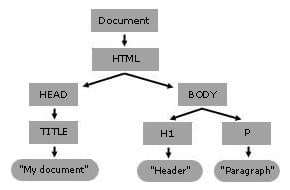
Efficient DOM manipulation is critical for javascript widgets that update content dynamically. The DOM represents your widget’s structure as a tree, and understanding this hierarchy helps optimize updates. Use querySelector and addEventListener to attach events to elements, then manipulate the DOM with properties like textContent, methods like appendChild, and removeChild.
Group your JavaScript code together and keep it separate from HTML to reduce coupling. This separation makes your code more maintainable and easier to optimize. When updating content, use event.stopPropagation() to prevent unwanted event bubbling when multiple listeners are present. This technique helps avoid unnecessary event propagation that can slow down your widget.
For creating and manipulating elements, use createElement to generate new elements and appendChild to add them to the DOM tree. This approach keeps the DOM minimal and reduces the overhead of frequent updates. When updating multiple elements, consider batching DOM updates to minimize repaints and reflows, which are expensive operations that can impact performance.
In your DDLC widget, instead of updating the DOM for each character change, batch multiple updates together and apply them in a single operation to minimize performance impact.
Animation Techniques for Smooth Widget Performance
Animation is often the most performance-sensitive part of a javascript widget. Use requestAnimationFrame for all animations in your widget. This browser API schedules your animation callback to run just before the next repaint, ensuring animations run at the display’s refresh rate (typically 60 Hz).
Pass the timestamp argument provided by requestAnimationFrame to compute animation progress. Without this parameter, your animations would run faster on high-refresh-rate screens. Call requestAnimationFrame again inside your callback to keep the animation running, and cancel it with cancelAnimationFrame when your widget is hidden or destroyed to prevent unnecessary processing.
For complex animations, consider using CSS transitions and transforms when possible. These are generally more performant than JavaScript-based animations because they can be accelerated by the browser’s GPU. However, for dynamic content that requires JavaScript logic, stick with requestAnimationFrame but optimize your calculations to minimize work done in each frame.
In your DDLC widget, character transitions and visual effects would benefit from requestAnimationFrame to ensure smooth, responsive animations that don’t interfere with the widget’s core functionality.
Code Size Reduction Strategies for JavaScript Widgets
Reducing your js script size improves loading times and widget performance. Apply minification to your code, which removes whitespace, shortens variable names, and optimizes syntax to reduce the file size without changing functionality. This is especially important for javascript widgets that need to load quickly.
Implement code-splitting techniques to load only the code needed for the current widget state. For your DDLC widget, you could split code by character or by scene, loading only what’s necessary for the current interaction. This approach reduces the initial load size and allows for more efficient resource usage.
Set a performance budget to guard against code size regressions as you add features to your widget. This budget acts as a constraint that helps you make informed decisions about what to include and what to leave out. Regularly audit your widget’s performance using tools like Lighthouse to identify areas where file size can be reduced without sacrificing functionality.
Consider using a build tool like Webpack or Rollup to automatically apply optimizations like tree shaking (removing unused code) and dead code elimination during your build process. These tools can significantly reduce your widget’s file size while maintaining all the functionality you actually use.
Sources
- MDN Web Performance API — Using performance APIs to measure and optimize widget execution: https://developer.mozilla.org/en-US/docs/Web/Performance
- MDN EventTarget addEventListener — Best practices for efficient event handling in JavaScript widgets: https://developer.mozilla.org/en-US/docs/Web/API/EventTarget/addEventListener
- MDN Control Flow and Error Handling — Managing state with proper scoping and control structures: https://developer.mozilla.org/en-US/docs/Web/JavaScript/Guide/Control_flow_and_error_handling
- MDN Document Object Model Introduction — Optimizing DOM manipulation for dynamic content updates: https://developer.mozilla.org/en-US/docs/Web/API/Document_Object_Model/Introduction
- MDN requestAnimationFrame - Optimizing animations for smooth widget performance: https://developer.mozilla.org/en-US/docs/Web/API/Window/requestAnimationFrame
Conclusion
Optimizing your javascript widgets requires a thoughtful approach to state management, event handling, and DOM updates. By consolidating state into a single object, implementing event delegation, and using requestAnimationFrame for animations, you can significantly improve performance while reducing file size. These best practices ensure your DDLC-themed widget remains responsive and efficient even as it grows in complexity.
Remember that optimization is an ongoing process. Regularly profile your widget’s performance, measure the impact of your changes, and continue refining your implementation. The techniques discussed here provide a solid foundation for creating performant javascript widgets that deliver a smooth user experience without unnecessary overhead.
The MDN Web Performance page recommends using the Performance API—especially the High-precision timing and Long Animation Frame APIs—to measure how long your widget’s code runs and to detect jank. It also advises adopting lazy loading and speculative loading for non-critical resources, and using DNS-prefetch, preconnect, and prefetch hints to cut latency. To keep the bundle small, apply minification and code-splitting, and set a performance budget to guard against regressions. Profiling with the built-in Firefox profiler or the Firefox Profiler Performance Features helps identify expensive event listeners or DOM updates. Finally, use event delegation and requestAnimationFrame for animations, and refer to the CSS vs. JavaScript animation performance guidelines to choose the most efficient approach.
Use closures to keep state and avoid creating new functions in loops. Reuse a single handler function instead of anonymous ones so you can remove it later and reduce memory usage. Use event delegation to attach one listener to a parent element and filter events by target, which cuts down on the number of listeners and file size. Take advantage of the once, passive, signal, and capture options in addEventListener to automatically clean up listeners, avoid jank on scroll, abort listeners, and control propagation. If you need a fixed this context, bind the handler or use an object that implements handleEvent. For scroll-heavy widgets, set { passive: true } on wheel or touch events to let the browser start scrolling immediately.
Use block statements for every if/else and switch to keep code readable and prevent accidental fall-through. Prefer let and const over var so that state variables are block-scoped and cannot leak into other parts of the widget. For widgets with many states, keep a single state object and use a switch statement to transition between states. Attach event listeners to a single parent element and use event delegation to reduce the number of listeners, then handle events inside a try/catch block to catch errors and use finally to clean up any temporary resources. This pattern keeps the code small, reduces global variables, and makes debugging easier.
Use querySelector and addEventListener to attach events to elements, then manipulate the DOM with textContent, appendChild, and removeChild. Group JavaScript together and keep it separate from HTML to reduce coupling. Use event.stopPropagation to prevent unwanted bubbling when multiple listeners are present. Create elements with createElement and add them to the tree with appendChild to keep the DOM minimal. The DOM tree is a tree structure that represents the document. This approach helps optimize widget performance by reducing DOM manipulation overhead and improving code organization.
Use requestAnimationFrame for all widget animations. It is a one-shot callback that fires just before the next repaint, so the animation runs at the display’s refresh rate (typically 60 Hz). Pass the timestamp argument to compute progress; otherwise the animation will run faster on high-refresh-rate screens. Call requestAnimationFrame again inside the callback to keep the animation running, and cancel it with cancelAnimationFrame when the widget is hidden or destroyed. By scheduling DOM updates with requestAnimationFrame you avoid layout thrashing and reduce CPU usage, which also helps keep the file size small by allowing you to bundle only the animation logic.
