JMeter Sequential Thread Execution Configuration
Configure JMeter to run threads sequentially, ensuring each thread completes before the next one starts for performance testing with large user bases.
How can I configure JMeter to run threads sequentially, ensuring each thread completes before the next one starts? I’m running a performance test with 100 users (stored in a CSV file) that need to login, navigate to a booking area, fill a form, and submit a booking. Currently, all threads start simultaneously, causing system overload and test failures. I’m using a single thread group with 6 HTTP requests that cycle through all 100 users. How can I modify my JMeter configuration to ensure threads run one at a time without creating 100 separate thread groups?
JMeter thread groups don’t natively support sequential execution by default, but you can achieve this behavior using several approaches like Ultimate Thread Group, standard thread group configurations with timers, or scripting solutions. For your 100-user test scenario, the Ultimate Thread Group plugin provides the most straightforward way to ensure each thread completes before the next one starts, preventing system overload while maintaining all your test logic in a single thread group.
Contents
- Understanding JMeter Thread Groups and Their Limitations
- Using the Ultimate Thread Group for Sequential Execution
- Implementing Sequential Execution with Standard Thread Groups
- Alternative Approaches for Sequential Thread Testing
- Best Practices for Sequential JMeter Testing with Large User Bases
Understanding JMeter Thread Groups and Their Limitations
JMeter’s standard Thread Group is designed for concurrent execution rather than sequential processing. When you configure a standard Thread Group with 100 threads, JMeter launches all threads simultaneously based on the ramp-up period, causing them to execute your 6 HTTP requests concurrently. This behavior is intentional for performance testing—after all, you typically want to simulate real-world scenarios where multiple users access your application at the same time.
But what happens when your test environment can’t handle this load? The result is exactly what you’re experiencing: system overload and test failures. The standard Thread Group simply doesn’t have built-in options to make threads wait for each other to complete before starting. Each thread operates independently, executing the entire test plan from login through form submission without any awareness of other threads’ completion status.
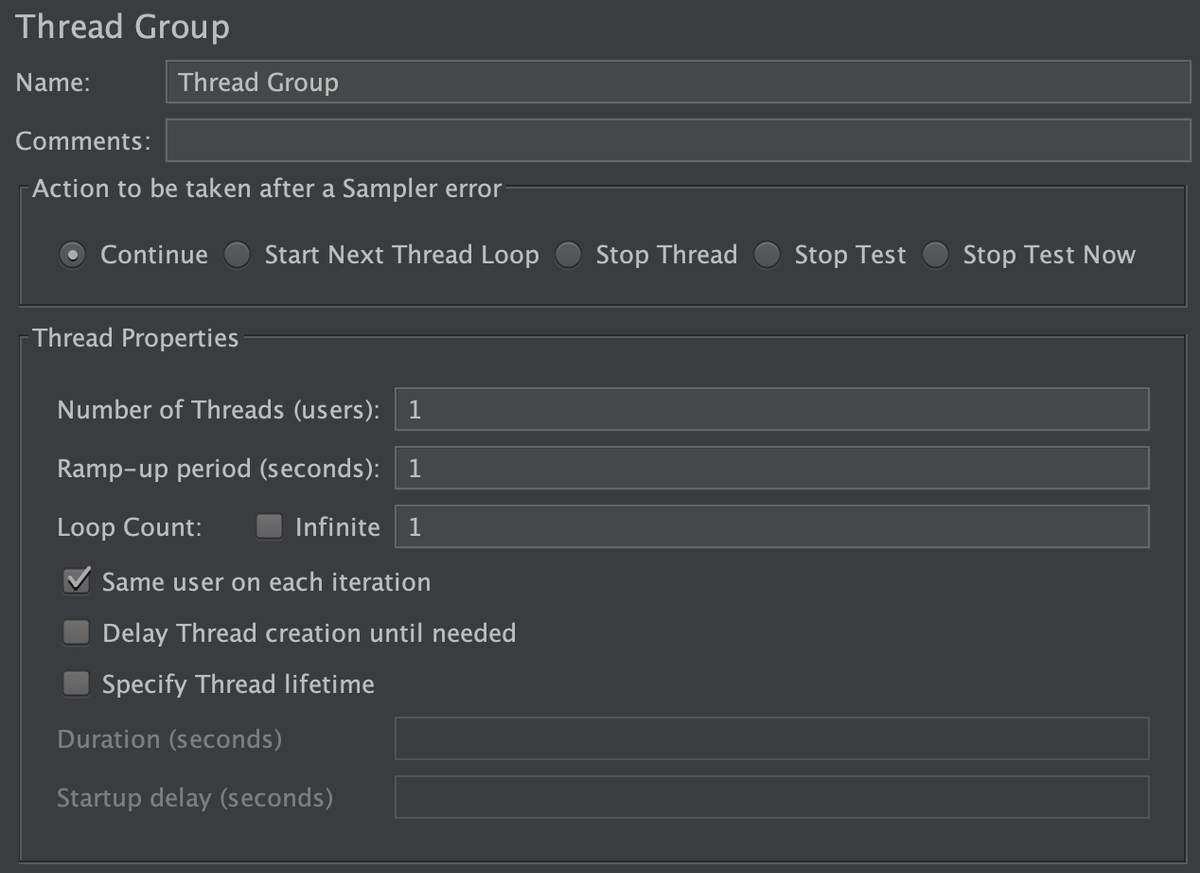
The Thread Group controls three main parameters: thread count, ramp-up period, and loop count. The thread count determines how many users are simulated, the ramp-up period specifies how long JMeter takes to start all threads, and the loop count defines how many times each thread should execute the test plan. None of these parameters, however, can enforce sequential execution between threads.
For your specific scenario with 100 users from a CSV file, this limitation becomes particularly problematic. When all 100 threads start at once, they’re all trying to read from the CSV file simultaneously, potentially causing file access conflicts and overwhelming your test environment. You need a solution that allows threads to execute one after another while still processing all 100 users efficiently.
Using the Ultimate Thread Group for Sequential Execution
The Ultimate Thread Group is a powerful JMeter plugin that addresses the sequential execution limitation of standard Thread Groups. This advanced thread group was specifically designed to give testers more control over thread behavior, including the ability to run threads sequentially rather than concurrently. To use this approach, you’ll first need to install the Ultimate Thread Group plugin in your JMeter installation.
Installation is straightforward—simply download the plugin, place it in JMeter’s lib/ext directory, and restart JMeter. Once installed, you’ll find the Ultimate Thread Group option when creating a new thread group in your test plan. Now, here’s how to configure it for sequential execution:
- Replace your standard Thread Group with an Ultimate Thread Group
- Set the “Number of Threads” to 1
- Set the “Loop Count” to 100 (to process all your users)
- Configure the “Startup Delay” between iterations to 0 (or add a small delay if needed)
- Ensure your CSV Data Set Config is properly configured to read user credentials
- Add your 6 HTTP requests as before
The magic here is that with only one thread but 100 loops, the Ultimate Thread Group will execute your entire test flow (login, navigation, form filling, submission) once, then start over for the next user from your CSV file. This creates perfect sequential execution where each complete user flow finishes before the next begins.
Why is this approach superior to creating 100 separate thread groups? First, it keeps your test plan organized and manageable. Second, it ensures proper CSV file handling without conflicts since only one thread accesses the file at a time. Third, it allows you to easily modify or debug your test logic in one place rather than across multiple thread groups.
The Ultimate Thread Group offers additional benefits like controlling the delay between iterations, which can be helpful for simulating realistic user think time between complete test cycles. You can also configure it to stop after a certain number of successful iterations or failures, giving you more control over test execution.
Implementing Sequential Execution with Standard Thread Groups
If you prefer not to use plugins or need a solution that works with standard JMeter components, you can implement sequential execution using creative configurations with standard Thread Groups and timers. This approach requires a bit more setup but provides the same sequential behavior without adding external dependencies.
The key insight here is that sequential execution means only one user should be active at any given time. How can we achieve this with standard Thread Groups? Set your thread count to 1 and your loop count to 100. This configuration tells JMeter to create one thread that will execute your test plan 100 times, processing one user from your CSV file per iteration.
But wait—what if you need to simulate multiple users working simultaneously at some point? That’s where timers come in. While this approach ensures complete sequential execution for your current scenario, you can strategically add timers between requests to create more realistic user behavior. For example, add a Constant Timer with a random delay between 1-5 seconds after the login request to simulate user think time.
Here’s how to set this up properly:
- Configure your Thread Group with:
- Number of Threads: 1
- Ramp-up Period: 1 (or 0)
- Loop Count: 100
-
Ensure your CSV Data Set Config is set to “Recycle on EOF” and “Stop thread on EOF” if you want to process exactly 100 users
-
Add any necessary timers between requests to simulate realistic user behavior
-
Consider adding a Transaction Controller to group your requests logically
This approach has advantages beyond just sequential execution. With only one active thread, you’ll see clearer logging and easier debugging since you can follow a single thread’s execution path. Memory usage will also be significantly lower compared to 100 concurrent threads.
The downside? You lose some flexibility. If you later decide you want to test with concurrent users, you’ll need to reconfigure your Thread Group. Additionally, the single-thread approach may not accurately reflect certain types of system behavior under load that only manifests with multiple concurrent threads.
Alternative Approaches for Sequential Thread Testing
Beyond the Ultimate Thread Group and single-thread configuration, several other methods can achieve sequential execution in JMeter. Each approach has its own strengths and use cases, so understanding the alternatives helps you choose the right solution for your specific testing needs.
One powerful alternative is using JMeter’s JSR223 elements to implement custom thread synchronization logic. You can add a JSR223 PreProcessor at the beginning of your Thread Group that checks if other threads are still running. If they are, the thread waits; otherwise, it proceeds with execution. This approach gives you fine-grained control over synchronization but requires some coding knowledge.
Another creative solution involves using JMeter’s __threadNum() function to control execution order. You can modify your requests to check the current thread number and only execute when it’s the expected thread’s turn. This approach is more complex but can be useful in scenarios where you need specific ordering that doesn’t follow simple sequential patterns.
For advanced users, the JMeter Plugins Manager offers additional thread group options like the Stepping Thread Group, which can be configured to gradually increase thread count while still maintaining some control over execution flow. While not perfectly sequential, it provides a middle ground between concurrent and completely isolated thread execution.
What about distributed testing environments? If you’re running JMeter in distributed mode, you can configure the remote systems to execute sequentially rather than concurrently. This approach requires coordinating across multiple JMeter instances but can be useful for very large-scale tests that exceed the capacity of a single machine.
Finally, consider the “Controller” approach using JMeter’s If Controllers. You can structure your test plan with separate logic for each user and use conditional logic to determine which user should execute at any given time. While this requires more complex test plan design, it offers maximum flexibility for complex sequential testing scenarios.
Best Practices for Sequential JMeter Testing with Large User Bases
When implementing sequential thread execution with large user bases like your 100-user scenario, several best practices ensure your tests remain effective, maintainable, and realistic. These practices help you avoid common pitfalls while maximizing the value of your sequential testing approach.
First and foremost, consider your test environment’s capacity. Sequential execution reduces system load, but it also extends test duration. A test that might take 10 minutes with concurrent threads could take several hours with sequential execution. Plan accordingly and consider running sequential tests during off-peak hours to minimize impact on other testing activities.
CSV file handling requires special attention in sequential tests. With only one thread accessing the file at a time, you won’t encounter the file access conflicts common in concurrent tests. However, ensure your CSV Data Set Config is properly configured to read sequentially through your user data. Set “Recycle on EOF” to false if you want to stop after processing all 100 users, or true if you want the test to continue with additional loops.
Logging becomes particularly important in sequential tests since only one thread is active at a time. Take advantage of JMeter’s logging capabilities to track which user iteration is currently executing. Consider adding Debug Samplers or custom logging to your test plan to record progress, making it easier to identify where the test might be failing or experiencing delays.
Error handling strategies should differ between sequential and concurrent tests. In sequential execution, a failure in one user iteration doesn’t affect others, so you can configure different error handling approaches. Consider using JMeter’s Assertions effectively and think about whether you want failed iterations to continue or stop the entire test.
Think time simulation is another critical consideration. While sequential execution already reduces system load, adding realistic think times between requests makes your tests more accurate. Use timers like Constant Timers, Gaussian Random Timers, or Uniform Random Timers to simulate realistic user behavior between actions.
Finally, document your sequential testing approach thoroughly. Since sequential testing behaves differently from standard concurrent testing, future team members (including yourself) need to understand why this approach was chosen and how it impacts test results and execution times. Include information about expected test duration, system load characteristics, and any limitations of the sequential approach.
Sources
- Apache JMeter Documentation — Standard thread group limitations and concurrent execution behavior: https://jmeter.apache.org/usermanual/index.html
- BlazeMeter Blog — Ultimate Thread Group configuration and sequential execution approaches: https://www.blazemeter.com/blog/how-to-run-jmeter-threads-sequentially
- Tools QA Tutorial - Thread group configurations and timer implementations for sequential testing: https://www.toolsqa.com/jmeter/jmeter-thread-group/
Conclusion
Achieving sequential thread execution in JMeter requires moving beyond the standard Thread Group’s concurrent design. The Ultimate Thread Group plugin provides the most straightforward solution by allowing you to configure a single thread with multiple iterations, processing each user from your CSV file completely before starting the next. For those preferring standard components, configuring a Thread Group with 1 thread and 100 loops achieves similar results without adding dependencies. Regardless of your approach, remember that sequential testing extends test duration but reduces system load, making it ideal for environments with limited capacity or when you need to isolate individual user flows for debugging purposes.
Apache JMeter’s standard Thread Group does not natively support sequential execution where one thread must complete before the next begins. Each thread executes the test plan completely independently of other test threads, simulating concurrent connections to server applications. The Thread Group controls the number of threads, ramp-up period, and execution count, but these features are designed for concurrent rather than sequential execution. For true sequential thread behavior, JMeter offers alternative approaches including Ultimate Thread Group, custom scripting with timers, or distributed testing configurations.
To run JMeter threads sequentially without creating multiple thread groups, you can use the Ultimate Thread Group plugin. This advanced thread group allows you to configure threads to run one after another rather than concurrently. With the Ultimate Thread Group, you can set the number of threads to 1 and configure it to loop through your 100 users from the CSV file. Each iteration will represent one user completing the entire test flow (login, navigation, form filling, and submission) before the next user begins. This approach prevents system overload while maintaining all your test logic within a single thread group configuration.
For sequential execution in JMeter, consider using timers to control thread pacing. While the standard Thread Group doesn’t support sequential execution out of the box, you can add timers between your HTTP requests to create artificial delays that simulate sequential behavior. Another approach is to use the Thread Group with a thread count of 1 and configure it to loop 100 times, processing one user at a time. This method ensures that each thread completes its entire test flow before the next iteration begins. For more sophisticated control, explore JMeter’s scripting capabilities with JSR223 elements to implement custom thread synchronization logic.


